Advertising on ChatGPT has been live across Europe since 24 August, in 31 markets, six months after the test that began in the United States on 9 February. And since 31 August you can buy it yourself: OpenAI has opened the self-service beta of Ads Manager to advertisers across these markets, startups and SMEs included. We have opened an account and our first campaigns are already in the platform, so alongside how the system works according to the official documentation, here you will also find what the back end actually looks like.
What a ChatGPT ad looks like
Ads appear at the end of a response, in a separate box labelled as sponsored. Each ad contains six elements: the advertiser name, the favicon with their logo, the headline, the description copy, the landing page and the image.
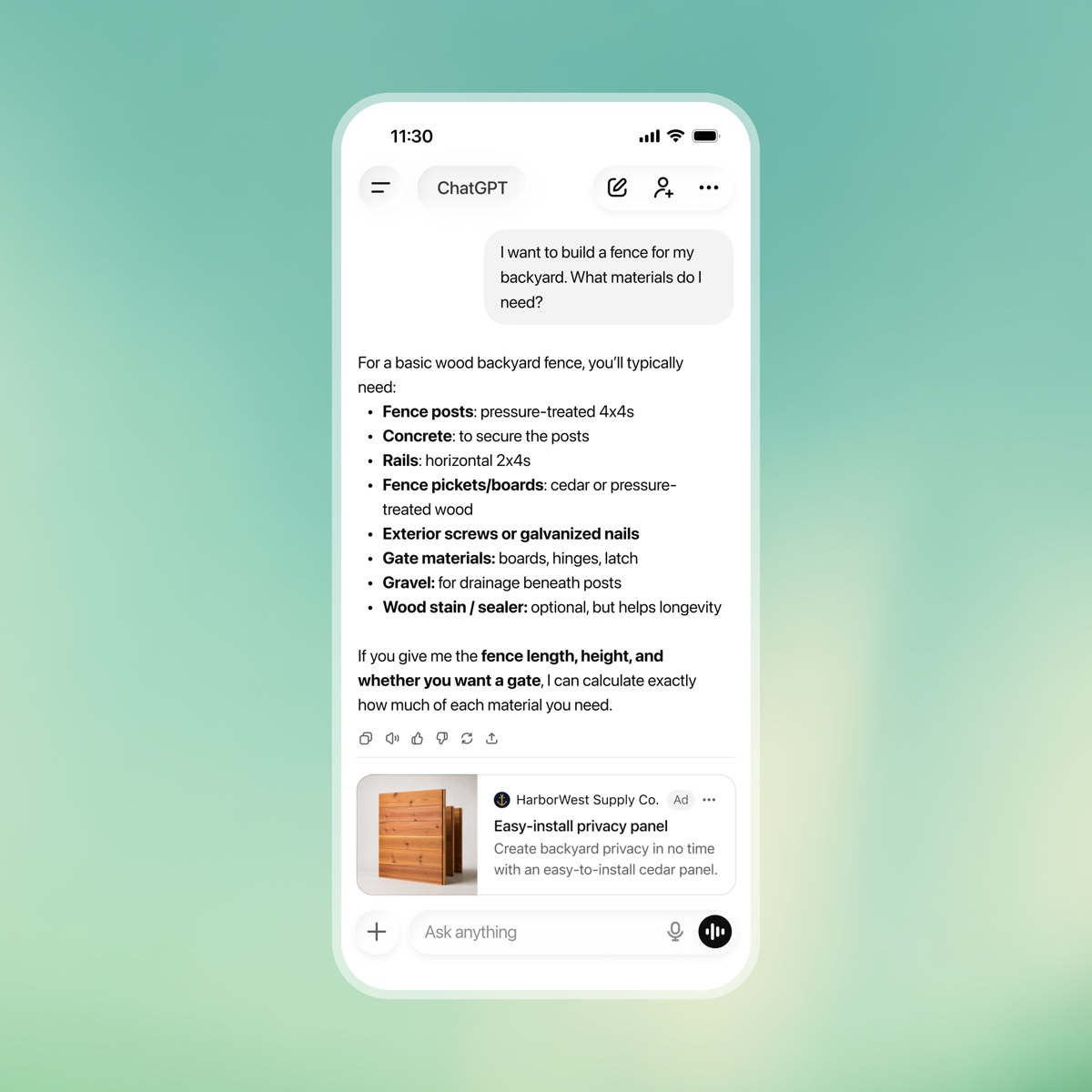
The result resembles a product card. More than one ad unit can appear below a response, and a single unit can feature several items from the same advertiser or from different ones. In longer conversations OpenAI says it takes overall context and user experience into account.
Two exclusions worth knowing: during the test ads do not appear in the ChatGPT Atlas browser, and they do not appear in temporary chats.
How ads are selected, and why Europe works differently
Here is the data point worth isolating, because it directly affects anyone planning in Europe and I have not seen it in this week’s coverage.
The system selects ads on expected relevance and outcomes. It weighs the context and intent of the current conversation, the landing page, the ad’s headline and copy, the context hints provided by the advertiser and, when personalisation is enabled, signals from the user’s broader experience.
The point is that personalised ads are not initially available in the European Economic Area or Switzerland. In Europe, then, selection leans on the context of the current conversation plus basic signals such as language and general location, without drawing on past chats, memory or ads history. Anyone coming from Meta, where profiling is the main lever, needs to recalibrate: here semantic relevance to what the person is asking right now is what wins.
Context hints deserve a note. At ad group level the advertiser can describe conversations, topics or keywords their products are relevant to, but OpenAI is explicit: these are not exact-match keywords and they do not guarantee delivery in specific conversations. Anyone arriving from Google Ads expecting match-type control should set that habit aside, because here you steer a semantic match and you are not buying keywords.
Pricing and buying models
There are two documented campaign objectives.
- CPM, Reach objective: optimised for impressions, paid per thousand.
- CPC, Clicks objective: optimised for clicks, paid per valid click.
In the European expansion announcement OpenAI also mentions conversion-optimised cost per click (oCPC), introduced during the US tests for advertisers optimising towards business goals.
The maximum bid is set at ad group level. For click campaigns OpenAI suggests starting at a maximum of 3 to 5 dollars per click, and Ads Manager indicates whether a bid is competitive or risks limiting delivery. Selection runs through a second-price auction weighted by relevance, which means paying more than the others is not enough if the ad has nothing to do with the conversation.
Measurement and tracking
Ads Manager Beta reporting currently includes impressions, clicks, spend, click-through rate, average CPC, average CPM and conversions. Conversion measurement is configured inside the platform, and a mobile measurement partner can be connected.
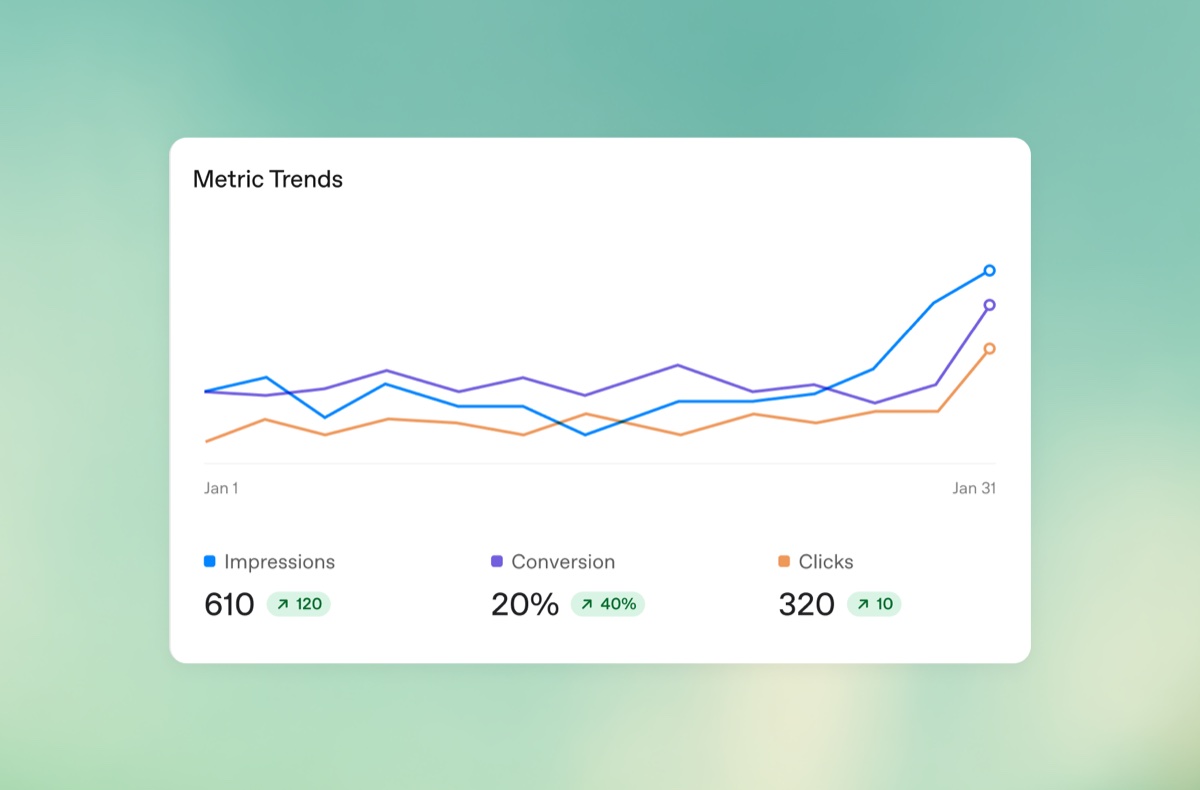
There is also the simple, underrated route: adding static tracking parameters such as UTMs to landing page URLs. They persist through the click and let you read ChatGPT Ads traffic inside the analytics tools you already use, without waiting for integrations.
Who sees ads, and who can opt out
Ads may appear to users on the Free and Go plans. Plus, Pro, Business, Enterprise and Edu stay ad-free, and no ads are shown to accounts identified as belonging to people under 18, based on account-level age information and age prediction where available.
One detail changes the addressable audience, though: the Free plan includes an ads-free option. Choosing it removes ads in exchange for lower usage limits and reduced feature access, for example fewer messages per day and no access to tools like image generation. So the ad audience does not equal the whole free user base, and some will step out of it.
Where campaigns are bought, and the agency catch
At the 24 August launch, access ran through OpenAI’s Ads Solutions team, partner agencies and tech partners, with the large media groups named by trade press (Publicis, Omnicom, WPP, Havas, Dentsu and MediaPlus). Since 31 August the picture has changed: the self-service beta of Ads Manager is open to advertisers in the 31 European markets. Inside, you build campaigns one by one through a guided flow or in bulk via CSV, monitor impressions, clicks and spend with tables and exports, and manage permissions, API keys and billing. It remains a beta product still evolving, and buying through agencies and partners is still available.
Anyone working with an agency needs to know one specific constraint, spelled out during account creation: an agency cannot create the advertiser account on the client’s behalf. The client creates it and then adds the agency team with the relevant permissions. During setup you choose country, currency, time zone and advertiser type, and those settings cannot be changed later. Ten minutes where improvising is a bad idea.
Inside Ads Manager: what setting up a campaign actually looks like
Some things the documentation does not show, you only discover them by opening a real campaign. Here is what we found in ours, on an account targeting Italy (interface in Italian).
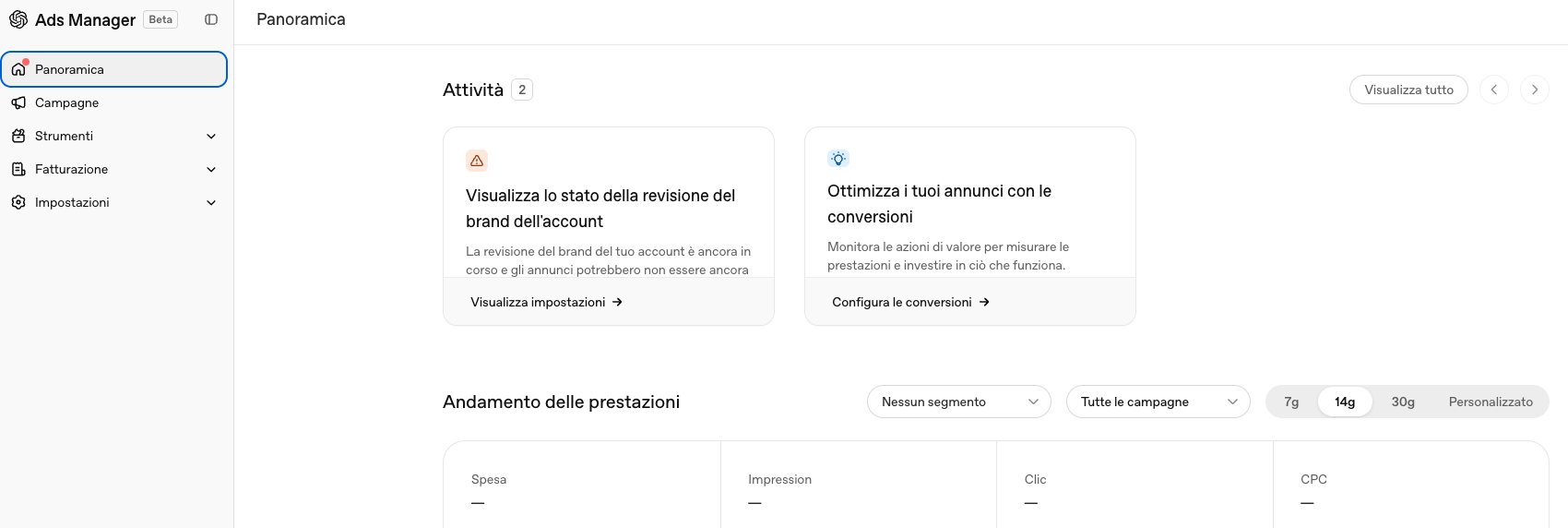
The overview is what you would expect from any ad platform, with spend, impressions, clicks and CPC in a single view and filters by segment, campaign and date range. The step we had not expected to weigh this much is the brand review: every new account goes through it, and until it clears, ads can stay on hold. Anyone planning a launch against a fixed date should factor it in. The panel also insists on conversion setup from the first login, and it has a point, because without it you only optimise on clicks.
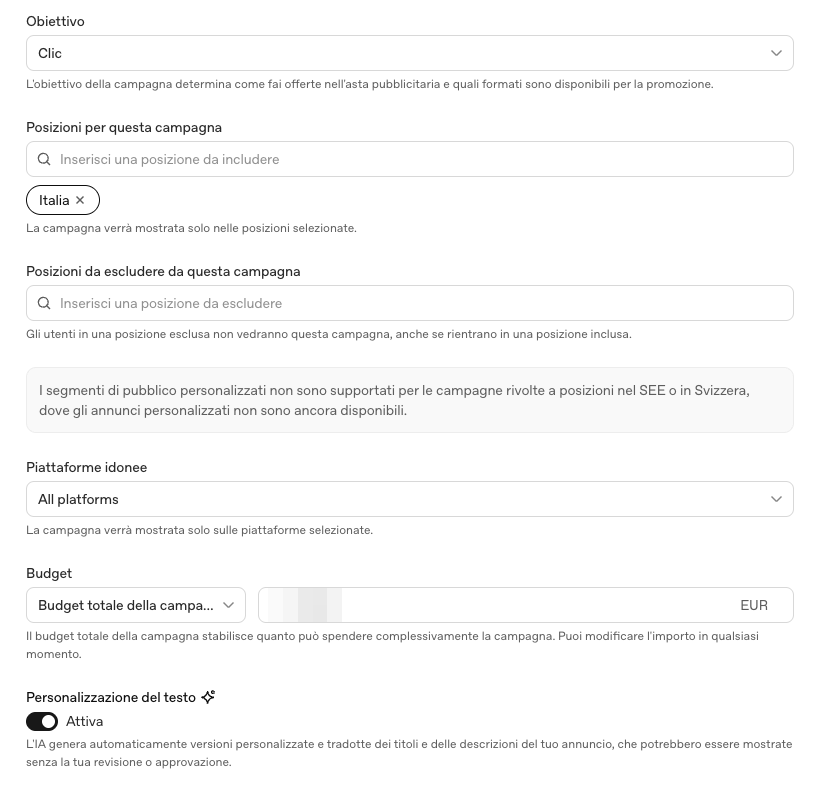
The structure recalls early Google Ads. Objective, geographic positions to include or exclude at country level, a total or daily budget in euros, little else. The personalisation notice followed us through every step, a banner repeating that custom audience segments are not supported for campaigns targeting the EEA or Switzerland. What we wrote above about contextual selection is spelled out inside the platform itself.
Then there is text personalisation, a toggle that comes switched on. It authorises the AI to generate translated and personalised versions of your ad’s headlines and descriptions, and the warning says they may be shown without your review or approval. A generalist ecommerce can live with that. A brand that cares about message control should consider switching it off before publishing.
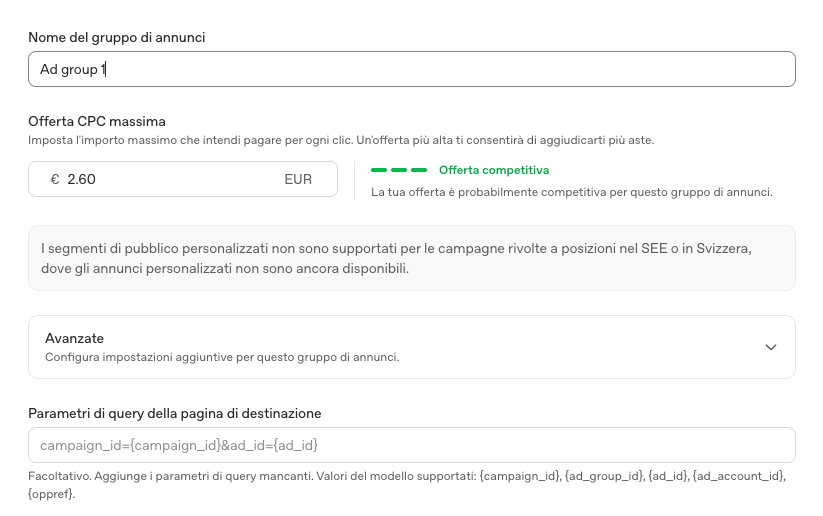
At ad group level you set the maximum CPC bid and the platform tells you straight away whether it is competitive. Here came the surprise: on Italy it already turns competitive below the 3 to 5 dollar range OpenAI indicates as a starting point. The auction is thin. Whoever enters now pays less per click than whoever arrives once budgets shift, a window that mature channels have not offered in years. At the bottom of the screen sit the landing page query parameters, with the {campaign_id}, {ad_group_id}, {ad_id} and {ad_account_id} templates. They are the native version of the UTMs discussed above, and they bring campaign-level granularity into analytics without waiting for integrations.
Who can buy: the eligible categories
Self-service access is not for everyone. At this stage OpenAI mainly admits consumer sectors, so lifestyle and home goods, local services, travel and experiences, digital products and education. Financial services, healthcare and legal only enter after manual approval, reviewed case by case. Everything else is currently off-limits. The list may widen over time, as it already has in the United States.
Anyone with a mixed catalogue should read the policies twice, because they apply to every element of the ad, landing page included. An approved creative cannot point to a landing page with disallowed content, and OpenAI’s own example is a food delivery ad landing on an alcohol delivery service.
Privacy, controls and brand safety
OpenAI states that it does not share conversations with advertisers and does not sell user data. Advertisers have no access to chats, chat history, memories or personal details, and receive only aggregated, non-identifying figures such as total views and clicks. If a user messages an advertiser through an ad, the advertiser sees only the messages sent directly to them.
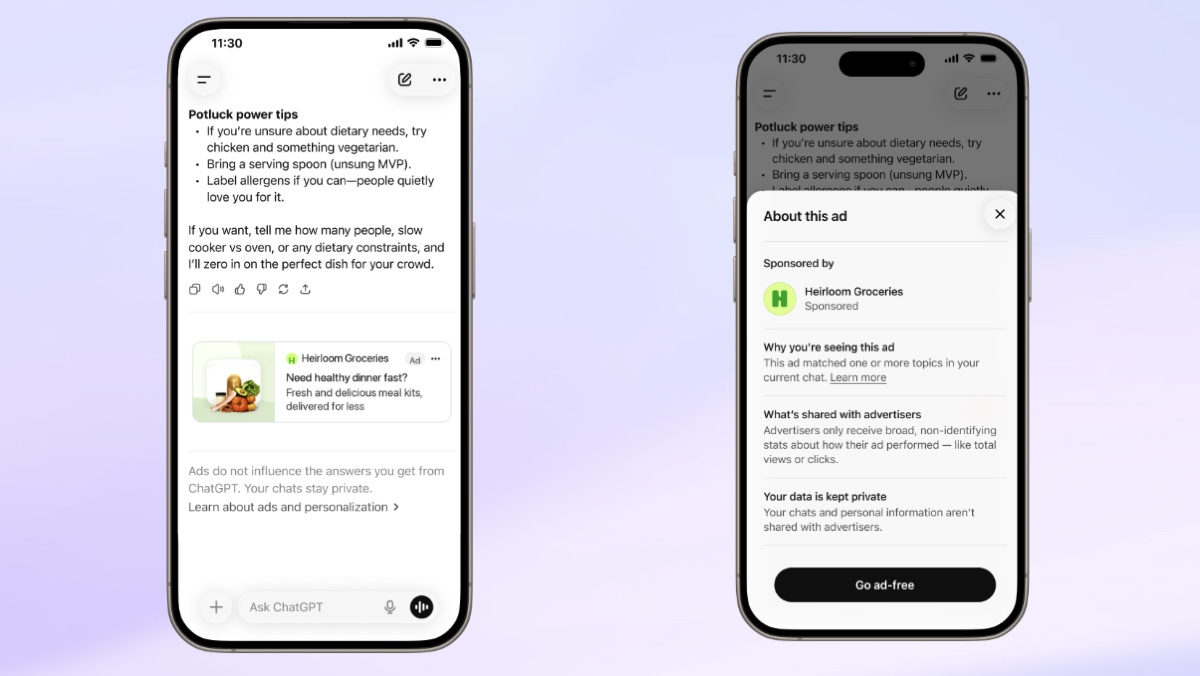
On the user side the controls are explicit. You can turn off personalisation, hide an ad with feedback, see why it appeared, and clear the data used for advertising, which is removed within thirty days. Turning personalisation off leaves the ads in place, it only changes the criteria they are selected on.
On brand safety the stated position is firm. Ads are not eligible to appear near sensitive or regulated topics, including personal health, mental health and politics, and political advertising is not allowed. Some regulated verticals, such as health and financial services, can advertise only if they meet strict eligibility criteria.
The 20% that sizes the opportunity
One figure released by OpenAI after the first months of testing deserves attention: 20% of conversations show clear commercial intent. Alongside it, tens of thousands of advertisers already active, cost per acquisition down roughly 60% in six weeks and CPM down 20%. Early advertisers named by OpenAI include Newegg, Best Buy, Lowe’s and VistaPrint.
It is a sign that people are using AI platforms for transactional questions too, the kind oriented towards buying. One fifth of conversations, across hundreds of millions of users, is a new market learning fast, where a natural phase of cost adjustment lies ahead.
On 31 August another figure arrived: ChatGPT Ads passed one billion dollars in annual recurring revenue, less than 200 days after the pilot launched. Budgets are already moving.
For anyone selling online it is a concrete opportunity, and this touchpoint is among the first worth holding.
What to do in the coming weeks
Measure organic presence before discussing budgets. This is the work we do every day with our observatory: recording which questions surface the brand in assistant answers, how often, which sources sit around it and where it stands against direct competitors. Measurements run in repeated cycles, because a single query on a Tuesday morning is an anecdote. That picture is what lets you calibrate targets and budgets when campaigns start, and it avoids the most expensive mistake, which is buying space under an answer that recommends a competitor. Citations inside assistants are measured with GEO Radar.
Prepare the creative. Reusing what already runs on Facebook or Google is the fastest way to waste budget. Here the available copy is short and the space is small, so headline, description, image and favicon have to be designed for this format: whoever optimises them for how the ad will actually appear starts ahead of whoever inherits them from another channel.
Write context hints like a brief, not like a keyword list. Without personalisation in Europe, relevance to the conversation is the main lever: describing well the topics your product is useful for counts more than any list of keywords.
Put campaigns inside a strategy rather than in place of one. The same rule applies as with Google Ads: switch on budget without positioning work behind it and you disappear the day it stops. ChatGPT behaves the same way, with one difference worth repeating: sponsored space sits below the answer, while getting inside the answer comes from authority and citations.
As always, we are testing these features first, on our own projects and for the clients who want to understand how this new channel behaves before everyone else: the account is active and the first campaigns are in the platform. Over the coming weeks we will publish the first data we gather here.
On one point, though, the logic we apply to every project still holds. ChatGPT Ads is a new tool and the direction the market is taking says it should be tested, measured and applied where it earns its place. A cure-all does not exist, not here and not on any other channel. An isolated tactic counts for little unless someone places it inside a wider strategy, and that calls for a single hand guiding every lever: when channels run on parallel tracks, budget and energy get scattered and the expected results stay out of reach.
Frequently asked questions